 Albuquerque Public Schools
APS Cybersecurity Month: AI-Powered Phishing
The APS Information Security team shares important information on the top cybersecurity threats and risks in education.
Phishing remains the main cybersecurity threat facing K-12 schools. And now, AI has made it worse. Attackers are using generative AI to create hyper-personalized and convincing scam emails, clone voices and create fake videos at a massive scale. Therefore, scams that used to be easy to spot now look real. This week, we’ll explain how phishing works, how AI has powered it, the main risks, and what to do to stop it.
Phishing is a type of social engineering attack. Bad actors use electronic communication such as email, text or phone calls to trick victims into giving up sensitive information or installing malware. The goal is to gain access to bank accounts and payment systems; student or employee credentials, SSNs, and other sensitive data; or critical systems and infrastructure.
Once inside, the risk is that attackers can steal money, impersonate students or staff, disrupt learning by locking access to data and systems, and compromise sensitive information for our schools and the entire APS community.
How do you recognize a phishing attack?
Here are the three most common types targeting education:
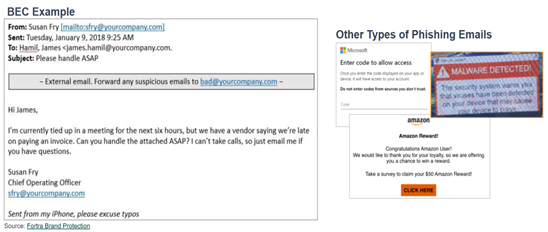
1. Phishing emails: Fake emails pretending to be from the IT department, your boss, your principal or a trusted vendor. Attackers trick victims into clicking a link that leads to a fake website or downloading an attachment that installs malware. One common and costly type is Business Email Compromised (BEC emails): criminals impersonate an executive, vendor, payroll/purchasing staff to trick employees into wiring money or changing direct deposit information.
2. Vishing, or Voice Phishing: Attackers call or leave voicemails pretending to be a trusted
source such as your bank, technology support, district leader/office, or even a family member to trick you into sharing passwords, personal information or authorizing a payment.
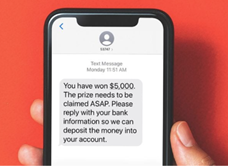
3. Smishing: Attackers send deceptive texts with links, email addresses, or phone numbers
that lead to fake websites or install malware when clicked.
AI makes it more dangerous.
AI-Powered phishing looks human, removing the warning signs that used to make scams easy to spot. Attackers use AI tools to write emails with perfect grammar, district logos, and names of real staff. Because AI can create hundreds of unique messages in seconds, traditional spam filters miss them. AI can also mimic the writing style of a principal, vendor, or executive, and even clone familiar voices and create fake videos.
How to avoid being a Victim of phishing emails, smishing, or vishing
- Be wary of any unsolicited email, text, or call asking for employee, student, or personal information. Assume it could be malicious.
- Pause on urgency, legitimate companies will never pressure you to bypass procedures or email/text you a link to update your personal information.
- Do not click links, phone numbers, or attachments, and do not reply to the message.
- Verify separately. Hover over links to see the real URL. Confirm with the sender using a different method; do not use contact info from the suspicious message or text. Look for "https" and the closed padlock icon.
- Never share sensitive information, codes, passwords, or one-time pins via email or text.
- Make the caller prove who they are to you. Do not proceed if they refuse verification.
- Use Multi-Factor Authentication (MFA), whenever possible. Even if a password is stolen, MFA blocks over 95% of attacks.
If you clicked or think you were compromised: Change your password immediately, run a virus scan, report it to the Technology Service Desk at 505-830-8080.
Remember: Cybersecurity is a shared responsibility: Take Action, Be Proactive.
More helpful information: https://blog.knowbe4.com/report-social-engineering-
attacks-are-increasingly-using-audio-and-video-deepfakes?